

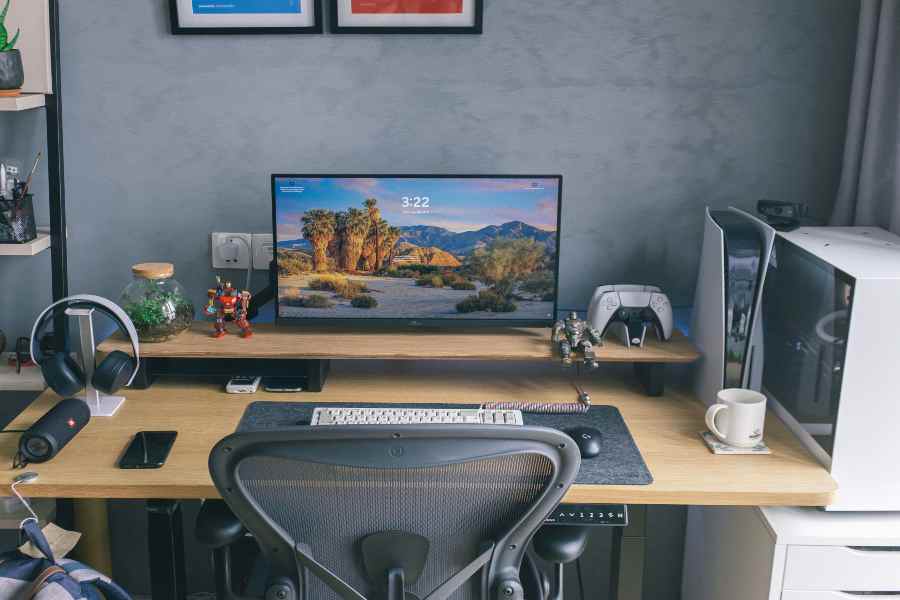
Building a high-performance computer setup for work requires more than grabbing fast parts off a retail shelf. Every component must handle heavy daily workloads without slowing down or overheating. A balanced system keeps apps running smooth, cuts export times, and removes annoying delays from your daily workflow.
Storage Configuration And Speed
Fast storage changes how fast your entire system operates. High-performance PCIe 4.0 NVMe drives offer sequential read speeds up to 6,000 MB/s, which eliminates loading delays.
Many professionals choose custom pc’s built for AI to handle heavy machine learning models and automated data scripts without hardware bottlenecks. Having dedicated local processing hardware reduces reliance on cloud subscriptions and keeps confidential project files stored safely on local drives. Investing in proper hardware ensures your local environment stays responsive during complex computations.
Splitting your storage setup between a fast primary boot drive and a secondary bulk storage drive keeps system files separated from heavy project assets. Running a dedicated drive for scratch files keeps your main operating system clean and responsive. Solid state drives also use less power and generate far less heat than traditional spinning hard drives.
Memory Upgrades For Intensive Workflows
System memory serves as the main workspace for open applications, browser tabs, and background scripts. Modern software programs eat up memory quickly when running at the same time. Industry insights show that running multiple background applications alongside primary work tools easily pushes past standard system limits.
- Fast DDR5 RAM kits reduce latency when switching between heavy applications.
- 64GB of memory provides enough headroom for virtual machines and heavy photo editing.
- Dual-channel memory configurations double the available bandwidth to the CPU.
- Error-correcting memory option choices prevent system crashes during critical renders.
Running out of RAM forces your computer to use virtual memory on your storage drive, which causes noticeable system lag. High memory capacity allows you to leave resource-heavy applications open in the background without closing them every hour. Choosing RAM kits with spreaders helps pull excess heat away from the memory chips during peak usage.
Power Supply Selection And System Reliability
A reliable power supply forms the backbone of any serious work build. Buying a cheap power unit risks sudden system shutdowns and potential hardware damage during peak usage spikes. Look for models rated 80 Plus Gold or higher to ensure steady electricity delivery and reduced heat output.
Modern power units feature fully modular cables, allowing you to connect only the wires your setup actually needs. Removing unnecessary cables improves internal case airflow and makes maintenance much simpler down the road. High-end power supplies also include built-in surge protection mechanisms that guard sensitive computer chips against power spikes.
Monitor Choices And Ergonomic Display Features
Your screen setup directly impacts daily output and eye comfort over long work sessions. Dual-monitor setups give extra screen real estate for reference materials, while single ultrawide screens offer clean, seamless viewing areas without center bezels.
Modern productivity displays feature built-in USB Type-C hubs that combine power delivery, data transfer, and Ethernet connections over one cable. Choosing screens with high color accuracy keeps design work precise, while elevated refresh rates reduce eye strain during long reading sessions. Highly adjustable desk arms let you position monitors at eye level to protect your neck posture.
Workspace Layout And Desk Ergonomics
Hardware power means little if your physical desk setup causes back strain or physical discomfort. Motorized standing desks make changing positions simple throughout long work days. Combining an adjustable desk, an ergonomic chair, and a high-end productivity keyboard creates an ideal physical setup.
- Motorized desk frames support heavy dual-monitor arms without wobbling.
- Ergonomic mice promote a natural wrist angle to prevent repetitive strain injuries.
- Under-desk cable trays keep power strips and thick cords organized and off the floor.
- Desk pads dampen mechanical keyboard sound while protecting wood desk surfaces.
Setting up proper desk lighting reduces contrast glare between bright monitor screens and dark room backgrounds. Light bars that mount directly on top of monitors cast illumination downward without creating screen reflections. Maintaining proper physical alignment keeps fatigue away during intensive crunch periods.
Cool Systems Stay Stable Under Pressure
Cooling performance determines how long your components sustain peak speeds under load. Air coolers provide reliable, low-maintenance heat dissipation using thick copper heat pipes and dual fans. Liquid coolers use radiator blocks to pull heat directly away from the CPU, keeping internal case temperatures lower.
Choosing silent PWM fans lets your motherboard adjust fan speeds automatically, keeping your desk quiet during light work and ramping up airflow only when hardware temperatures rise. Proper fan placement creates positive air pressure inside the computer case, which pushes dust out through small gaps and vents. Clean air filters keep dust buildup off internal heatsinks, preserving cooling performance over months of heavy use.
Sound Control Strategy For Deep Concentration
Fan noise disrupts concentration during long coding or editing sessions. Selecting a computer case lined with sound-dampening foam blocks high-frequency motor hums from reaching your ears. Larger 140mm fans move the same volume of air as smaller fans while spinning at much lower revolutions per minute, producing less noise overall.
Using soft rubber mounts on internal fans eliminates vibrations before they translate into case noise. Solid front case panels redirect fan noise away from your seating position toward the back of your desk setup. Decoupling mechanical storage drives with rubber grommets stops low-frequency humming inside metal drive bays.
Storage Management And Data Backups
A smart storage layout pairs high-speed drives with robust backup systems. Recent guides emphasize that mixing drive types changes overall system responsiveness for the better. High-speed NVMe drives handle active applications, while larger hard drives or network storage handle archival assets.
Setting up automated local backups protects critical work files against sudden drive failures or file corruption. Cloud backup software running silently in the background provides an off-site recovery option if hardware breaks down. Keeping redundant copies of essential project files guarantees you never lose days of hard work.
Network Hardware and Connection Speed
Fast hardware needs a solid internet connection to transfer large media files or pull updates from remote servers. Direct Wi-Fi connections work for basic web browsing, but wired Ethernet ports offer lower latency and steady speeds without dropouts. Motherboards equipped with 2.5G or 10G Ethernet ports move large data backups across local network drives in seconds rather than minutes.
Upgrading to quality Cat6 or Cat8 network cables prevents signal degradation between your desktop and router. High-bandwidth router ports prioritize work traffic over secondary network devices in your home. Low-latency network links make remote desktop sessions and cloud file syncs feel instant.
A well-planned desktop workstation brings speed, comfort, and reliability into your daily routine. Selecting matched components, setting up clean cable runs, and choosing comfortable peripheral gear transforms your desk space into a streamlined power base. Taking time to build a solid setup pays off every single working day.