

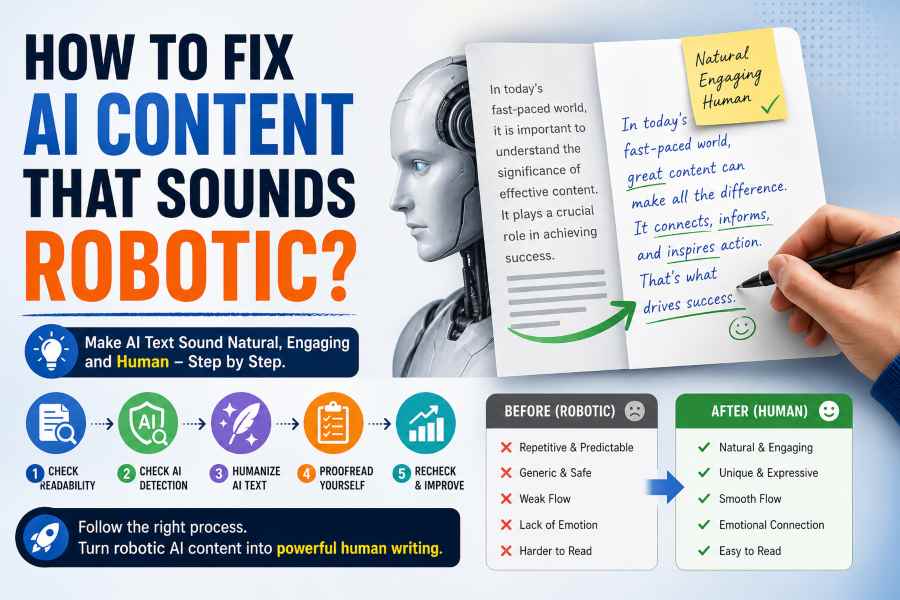
There is no doubt that AI tools have made content creation fast. However, they often produce text that is not very good to read. In fact, if we say that an AI tool generates robotic text, that would not be an incorrect statement.
Readers can quickly notice this. As a result, your content may lose trust and engagement.
The good news is simple. You can fix robotic AI content with a clear process. That process is what we will share with you in this blog post.
Why AI Content Sounds Robotic – Main Reasons
AI content follows patterns. That is the main reason it sounds unnatural. Here are the key reasons behind it:
1. Repetitive sentence structure
AI writes sentences in the same way again and again. Many lines start similarly and follow the same rhythm. This makes the content feel boring and predictable for readers.
2. Generic and safe word choice
AI prefers common and widely used words. It avoids risks and creative phrasing. Because of this, the tone feels flat and lacks personality.
3. Weak flow between ideas
AI does not fully understand how humans naturally connect thoughts. So, even if sentences are correct, they may not link smoothly. This breaks the reading experience and makes the content feel mechanical.
4. Lack of natural tone
AI struggles to match a human voice. It does not add:
- Emotion
- Emphasis
- Variation
As a result of this, the writing can feel cold and distant.
5. Poor readability in some cases
AI sometimes creates long or slightly complex sentences. These can slow down the reader. When readability drops, the content feels heavier and less engaging.
Easy Steps to Fix AI Content
Besides the reasons above, it does not mean that you should not use AI content. You can easily fix these problems by following these steps.
1. Check Readability
Start with readability. This step gives you a clear base. For this, paste your content into tools like Hemingway Editor.
The tool will highlight hard sentences. It will also show long and complex lines. Now, fix those issues one by one.
- Break long sentences into shorter ones.
- Replace difficult words with simple ones.
- Use clear and direct language.
Your goal is simple. Make every sentence easy to read. Aim for a lower grade level (below 8 is recommended).
2. Check AI Detection Score
Next, check how AI-like your content looks. Use any AI detection tool (ZeroGPT and Copyleaks are two reliable options).
These tools scan your content and give a score. This score shows how likely your content feels machine-generated.
Do not panic about the score. Instead, use it as a guide to improve your writing.
3. Humanize AI Text
Now, improve the tone by removing robotic elements and AI signals from your content.
For this, simply use an AI text converter. It will rewrite your content in a more natural way and remove robotic patterns. After running the content, read the output carefully. Make sure the meaning stays the same. This is a common issue with such tools. And, you need to ensure that you’re using a smart AI humanizer that can do the need full.
4. Proofread Yourself
Tools help, but you must do a final check yourself. Read your content out loud. This trick works very well. If something sounds odd, fix it.
Look for repeated words and replace them with simple alternatives. Add transition words where needed. This improves flow between sentences.
5. Recheck Readability and AI Detection
Now is the time to run a final check. Paste your updated content again into Hemingway Editor. Make sure readability has improved.
Then check the AI detection score again. It should now look better. If needed, make small edits. Focus on clarity and flow. Do not over-edit.
At this stage, your content should feel human and smooth.
Common Mistakes to Avoid
Many writers make simple mistakes while fixing AI content.
- They rely only on tools. This approach does not work fully. Tools cannot replace human judgment.
- Skip proofreading. This leads to awkward sentences.
- Keep sentence patterns the same. Even after editing, the content still feels robotic.
- Over-editing. Some writers change too much and lose the original meaning.
To avoid these issues, balance tools with manual effort.
Conclusion
Fixing robotic AI content is not hard. Just follow the process we shared above. It is very easy to implement.
- Start with readability
- Check AI detection
- Humanize text
- Proofread content
- Run a last check
It is easy to fix AI content that sounds robotic. Try it for yourself, we bet you will be surprised by the quality of content you will get in the end.