


Infographic labels fail at the paste step. A chart can look finished in the preview and still dump broken glyphs into a plain-text converter. Downstream writers then retype every axis. banana ai image generator work only pays off on that desk if the labels survive a copy into a .txt file sitting next to the PNG.
Conversion teams already strip bold, columns, and soft hyphens before a draft goes to review. An AI chart that cannot survive that strip is extra typing, not a shortcut. The test is whether a colleague can rebuild the numbers from the text dump without opening the picture again.

Readable Labels Are the Conversion Test
Pretty bars are cheap. A label that pastes as “Q3 revemue” or a melted yen sign is expensive. The writer who has to reconstruct the series from memory will miss a decimal, and the published post will argue with the chart.
Keep the job narrow. The desk is making one labelled figure that can be quoted in a changelog, a README, or a support article. If the figure cannot be quoted, it is decoration.
That is also why a conversion blog cares. The same team that strips a Google Doc to plain text before review should strip a chart the same way. If the only way to recover “12.4%” is to stare at a PNG, the figure has already failed the house rule.
What to Collect Before You Open the Generator
Do the unglamorous work first. Write the title, the axis names, and the numbers in a text file. That file is the source. The picture has to obey it. NovaImage AI will not save a brief that only exists in someone’s head.
If the chart names a public product or a figure that changes, decide now whether the label must match a live spelling. Guessed brand marks are how a conversion desk spends an hour arguing a caption. Write the spelling in the text file before anyone opens the generator. A prompt is a bad place to invent a product name.
Keep the Source Numbers in a Text File
One .txt dump per figure. Title on line one. Series names on the next lines. Numbers as you want them quoted. No “make it punchy.” Punchy is how 12.4 becomes 124.
When the PNG comes back, paste any readable text out of it into a second file. Diff the two. If the second file cannot be built without squinting at pixels, the figure failed, even if the bars look balanced. Save both files next to the PNG. The next writer should not have to invent the series again.
How the Workflow Turns a Brief Into Labels
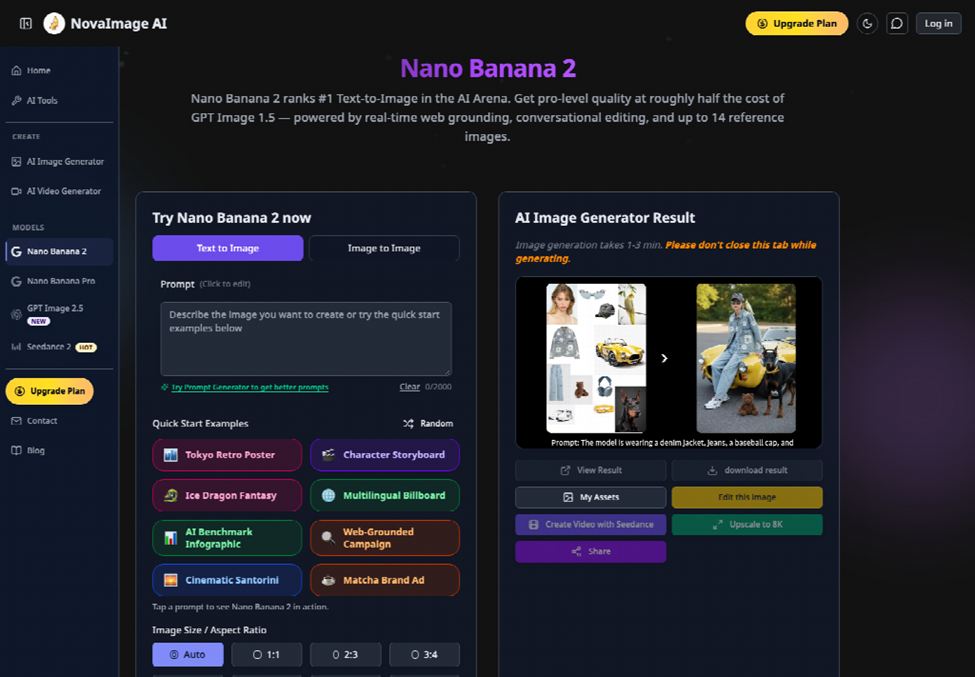
The fast image lane on that workspace is built for this kind of labelled still. Nano banana work here means Nano Banana 2, the model the site puts on speed and cheap iteration. Text-to-image at 2K starts at 5 credits. That is enough to try a layout without turning the figure into a budget meeting.
The published path is three moves: upload or describe, set parameters, then generate and iterate. Do not add a fourth “style pass” before the labels have been pasted. Style is how the axis disappears.
Stay on one figure until the dump is clean. A second generate with a new title is a new job. The 5-credit 2K pass is for the first honest layout, not for a mood board.
Upload or Type the Chart Brief
Type the chart as a brief, or upload a rough sketch plus the text file contents. The page allows a prompt from scratch or up to 14 reference images in one request. For a conversion desk, one sketch and the exact strings are enough. Do not feed seven mood boards. Extra references are how a simple bar chart grows a second title.
Then set the parameters the page actually shows. Pick an aspect ratio that matches the article column. Pick 2K while the labels are still moving. Toggle Web Search Grounding only when a label has to match a live public name. Generate once. If the first pass invents a second subtitle, do not “nudge the palette.” Delete the extra line in the next message, using the exact wording from the source file.
Edit One Label, Then Recheck the Rest
If one axis is wrong, say so in the next message and leave the other strings alone. Conversational edits on this lane are meant to change one element while the rest stay locked. A prompt that says “make the whole chart cleaner” is a new picture.
A nano banana pro pass can wait until the strings already paste clean and the desk needs a tighter layout. It is the wrong first click when the job is still “can we quote the axis.” Start on the cheap 2K pass. Promote only if the dump is already honest.
The Paste Check That Kills a Pretty Chart
Open the PNG. Select whatever text the OS will give you, or retype what you can actually read at article size, into the second .txt. Compare it to the source dump. Do this at the size the article will use, not at a zoomed preview. A label that is sharp at 200% and mush at column width is already unusable.
Reject the file if a series name changed, if a decimal moved, or if a Chinese or Japanese label became Latin noise. Nano Banana 2 is sold with readable text in English, Chinese, Japanese, Korean, Arabic, and more. That claim is only useful if the dump still reads in the language you typed. A bilingual chart that keeps English and drops the second language is a failed generate, not a “mostly fine” figure.
Time is the real bill. Retyping five labels looks small until it happens on every post in a series. The cheaper move is one honest 2K pass and a discard, not an afternoon of reconstructing numbers from pixels. A series of twelve posts with the same axis style will multiply that afternoon unless the first dump is treated as a gate.
Common misses worth naming:
- The title grew an extra word the source file never had.
- A percentage lost its decimal once the bar got thicker.
- A bilingual chart kept English and dropped the second language.
- The legend order no longer matches the source list.
Any one of those is a discard. Do not “fix it in the caption.” The caption will drift from the figure, and the next writer will trust the picture.
NovaImage AI is in the right place on this desk when the generate is short, the strings were written first, and the paste check is mandatory. It is in the wrong place when someone opens a blank prompt and hopes the numbers appear.
Where Labelled Charts Still Need a Human Pass
A generator will not notice that your source file already had the wrong quarter. It will not catch a legal name the brief misspelled. It will not decide whether a chart should exist. Those checks stay human. If the dump is clean and the brief was wrong, you still shipped a clean error.
Use the workspace when the strings are already decided and you need a figure that can be quoted. Skip it when the numbers are still in a meeting. NovaImage AI will keep drawing. The conversion desk has to refuse a PNG that cannot survive paste.