

How to Turn Existing Marketing Assets into New Ads with AI: My Experience Using Adsmaker.ai
Why Reusing Marketing Assets Makes Sense
Most brands already have a large collection of usable content. Product photos, promotional posters, social media graphics, and short videos often disappear after a campaign ends, even though the materials themselves are still valuable. Reusing them can reduce production time and keep marketing costs under control while allowing teams to focus on testing new creative ideas instead of rebuilding every advertisement from the beginning.
Instead of creating completely new assets, I wanted to see whether Adsmaker.ai could help transform existing materials into fresh advertisements. I uploaded visuals from previous campaigns and followed a normal marketing workflow. This review focuses on that experience, explaining what worked well, what still required manual effort, and where the platform fits into a practical creative process.
 Understanding Adsmaker.ai
More Than an Ad Creation Tool
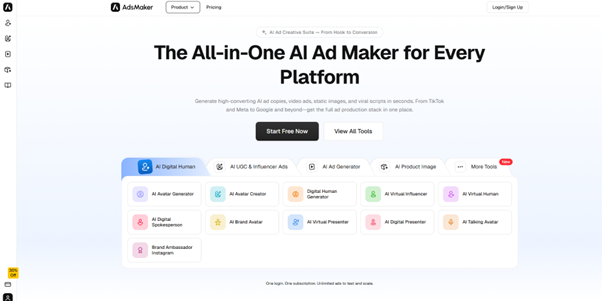
Adsmaker.ai combines several AI-powered features into one workspace instead of focusing on only one type of content. Alongside AI-generated advertisements, it also provides AI copywriting, product image enhancement, AI UGC creation, digital human videos, and templates designed for different advertising platforms. The platform aims to help users move from raw assets to finished campaigns without constantly switching between separate design and editing tools.
Features That Influenced My Workflow
During testing, several features became part of my daily workflow. The AI Ad Creator generated multiple advertising layouts from existing images, while the built-in copy generator suggested headlines and short descriptions. Product image enhancement improved several older photos, and export options supported common advertising formats for social media platforms. Instead of replacing every creative decision, these features mainly reduced repetitive production work.
Preparing Existing Marketing Assets
Starting with Content I Already Owned
Rather than downloading stock images, I gathered materials from previous campaigns. My folder included product photos with white backgrounds, promotional posters created for social media, several brand graphics, logos, and a short demonstration video that had originally been published as a vertical social media clip. None of these assets were created specifically for this review.
Why Existing Assets Were Enough
One thing I noticed early was that the platform did not require perfectly polished inputs. Some product photos were taken months ago, and a few promotional graphics had already been used multiple times. Even so, they served as solid starting points because the AI focused on generating new layouts and compositions instead of expecting brand-new creative resources every time.
How I Turned Old Assets into New Advertisements
Uploading Materials and Exploring New Layouts
The upload process was simple and did not require additional preparation. After adding my existing images and graphics, the platform quickly generated multiple advertising concepts instead of producing only one result. This approach felt more useful because it encouraged comparison between different visual directions rather than asking me to start designing from a completely blank canvas.
Refreshing Posters Instead of Redesigning Them
The most practical part of the experience involved updating promotional posters that had already been used in previous campaigns. Rather than changing only small design details, Adsmaker.ai reorganized backgrounds, adjusted layouts, and presented the same marketing message in several different styles. The advertisements looked refreshed while still preserving the original branding and product information.
Preparing Creatives for Different Platforms
Advertising rarely stays on a single platform today. I exported square, landscape, and vertical versions without manually resizing each design. This saved time because platform-specific dimensions are usually one of the most repetitive parts of campaign preparation. As an AI Ad Generator, the platform fits naturally into a workflow where the same campaign needs multiple visual formats.
What Worked Well During Testing
Faster Creative Exploration
Instead of spending the first hour deciding how an advertisement should look, I immediately had several concepts to compare. Some focused on minimal product presentation, while others emphasized promotional messaging or lifestyle imagery. Even when I did not use every version, having several starting points made the creative process feel faster and more flexible.
Better Use of Existing Brand Resources
Many AI design tools encourage users to generate completely new visuals, but my experience with Adsmaker.ai was different. The platform worked well when I supplied materials that already reflected my brand identity. Existing logos, colors, and product photos became the foundation for new advertisements instead of being replaced by unrelated AI-generated content.
Integrated Workflow Instead of Multiple Applications
Another advantage was the ability to perform several related tasks in one place. Rather than opening separate tools for writing copy, editing images, resizing advertisements, and generating new layouts, much of the workflow stayed inside the same interface. This reduced interruptions and made the overall production process feel more organized.
Where Manual Work Is Still Necessary
AI Suggestions Still Need Human Review
Although the platform generated multiple advertisements quickly, not every result matched my expectations. Some layouts communicated the product more clearly than others, and a few versions simply did not fit the campaign style. Human selection remained an important part of the workflow because choosing the strongest creative direction still requires marketing judgment.
Input Quality Affects Output Quality
I also noticed that image quality directly influenced the generated advertisements. High-resolution product photos usually produced cleaner layouts with better visual balance. Older images with poor lighting or lower resolution were still usable, but they often required additional editing before becoming campaign-ready. This is not unique to Adsmaker.ai, but it is worth considering before starting a project.
Who Can Benefit Most
Users Who Already Own Marketing Assets
The platform seems especially useful for businesses that already have large libraries of creative materials. E-commerce stores, software companies, agencies, and freelance marketers often accumulate hundreds of product images and promotional graphics over time. Instead of letting those files remain unused, Adsmaker.ai provides a practical way to convert them into fresh advertising content.
Teams Running Frequent Creative Tests
Modern advertising depends heavily on continuous experimentation. Small adjustments to visuals, headlines, or layouts can produce meaningful differences in campaign performance. An AI Ad Generator supports this process by making it easier to generate multiple creative variations from the same group of marketing assets without repeating every design task manually.
Why This Workflow Matters
Marketing Has Become an Iterative Process
Advertising has gradually shifted away from producing one perfect creative toward testing many different variations. Teams now launch multiple advertisements, compare performance, and refine successful concepts over time. In that environment, the ability to quickly repurpose existing assets becomes almost as valuable as creating completely new designs from scratch.
Asset Reuse Can Extend Content Value
One observation from this review is that many companies underestimate the value of their existing marketing libraries. Product photos, banners, and promotional graphics often remain useful long after the original campaign finishes. Instead of treating these materials as outdated, AI can reorganize them into new formats that support future campaigns while reducing repetitive production work.
Final Thoughts
A Practical Tool for Content Repurposing
After using Adsmaker.ai for several projects, I see it primarily as a tool for extending the life of existing marketing assets rather than replacing traditional design software. It helped generate new advertising concepts from materials that were already available, making campaign preparation more efficient without removing the need for human review. For businesses that regularly update advertisements across multiple platforms, this workflow offers a practical balance between automation and creative control.