

When you visit a website from your couch, that website will be able to tell whether you’re in the living room or a rack of servers within a second. There’s no need for it to see anything in a cookie or have you sign in to know it. All it needs is one little piece of information that everyone with a residential internet connection has: who is the owner of the IP address that the site sees when your device requests to visit the site.
A residential IP address is a kind of IP address assigned by your internet service provider for your home internet connection. It could be via a cable, DSL, fiber, or fixed wireless connection. Because the website can tell that the IP address is being accessed by an ordinary household, it passes the checks that stop servers, VPNs, and cloud traffic.
This article covers how residential IP addresses work, what websites can determine about them, how to verify whether your IP address is residential, and how businesses use residential IP addresses in other countries for testing and research.
What Is a Residential IP Address?
A residential IP address is the public IP address of your home router. These addresses are given out by your ISP from an allocated pool of public addresses that your ISP has registered their consumer broadband network for. All your devices such as a phone, laptop or smart TV will use this address when online.
It’s very likely that your residential IP address is dynamic. Your ISP can assign a new address to your router when the lease expires, or if your modem is restarted. This explains why you may find your IP changing after a power cut. The address will usually remain the same for a few weeks. Some ISPs offer static residential IP addresses for a monthly fee. These addresses are usually bought by people who host home servers, or want to get remote access to their home network that requires a static address.
How Residential IP Addresses Work
Every public IP address is part of a network, and that network advertises its IP address to the internet at large. That network is called an autonomous system and is owned by a person or organization that is public knowledge. If you are connecting via a residential internet connection, that owner would be a company that provides internet to consumers, such as a cable or telecom company.
That information is the first thing that websites look up. If a website does a lookup for a residential IP address, it’ll get an internet service provider name and a location near the subscriber. If a website does a lookup for an IP address associated with a data center, it’ll get the name of a hosting or cloud service provider.
This is a little surprising to many people. There aren’t any new IPv4 addresses available for providers to assign to customers anymore, and many providers use carrier-grade NAT, which allows them to put a hundred customers behind a single public IP address. So, it’s not uncommon for your neighbors to be using the same residential IP address as you. This is common on mobile connections, but now it’s becoming common with certain fixed broadband connections as well. Websites know this, and they don’t block those IP addresses outright. This issue is resolved on IPv6, as every home connection will get its own address block.

Diagram: how a residential IP address reaches a website through a home router and an internet provider
What a Website Sees When Your IP Address Arrives
A website won’t see your name or any of your browsing history. However, with IP intelligence tools, the website can see this short list of information about your IP address:
- Your IP address, and the network or provider (e.g. internet service provider, or cloud service provider) that owns that IP address
- An approximate location (country, and nearest city, usually)
- Your connection type (e.g. residential, mobile, business, hosting)
- If your IP is tied to a known VPN, proxy, or Tor exit node
- A risk score based on previous reports of abuse associated with that address
Residential IP addresses with a good history score well on all these measures. That’s the reason they are so important.
Residential vs Data Center IP Addresses
Data center IP addresses: IP addresses tied to a hosting provider or a cloud service provider and run on actual server hardware. They are fast, reliable, and cheap. Any visitor or business that is aware of them will see that they are hosted, and most anti-fraud companies will view them as a valid reason to run additional checks.
Residential IP addresses: IP addresses tied to a consumer internet service provider and a real home connection. They are slower and less reliable than data center IP addresses, but websites view them as real customers. Blocking them is expensive for a website because if they block them out they run the risk of blocking out real customers.
Mobile IP addresses: these are from cellular networks and are shared amongst a number of people using Carrier-grade Network Address Translation, and websites usually treat them like residential IP addresses.
ISP IP addresses: IP addresses registered to internet service providers and often sold as static residential IP addresses. Unlike home addresses, they are hosted on servers, which makes them almost as fast as data center IP addresses.
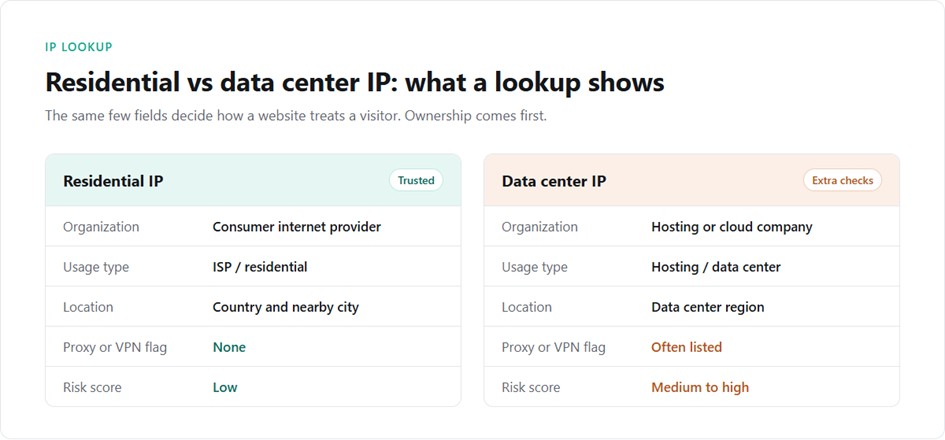
Residential vs data center IP: what an IP lookup shows for each
Is My IP Residential? How to Check
All it takes is a few minutes and a free lookup service. Try looking up a known address. If you go to a site that lets you look up an IP address and look up 8.8.8.8, then you should see Google. It’s the public DNS server for Google. If you look up an address from a cloud server, you’ll see Amazon, Microsoft, or some other hosting company. When you look up an address from your home, then you should see your internet service provider, such as Comcast or BT.
Look up the address using a service like ipinfo, IP2Location, or MaxMind. There are three fields to look for in the results:
- The Organization/ASN. An ISP address is usually residential, while a hosting or cloud server is a data center address.
- The Usage type. Some databases will label an address as an ISP, hosting, business, or mobile. Residential addresses are usually labeled as ISP, but the database might be wrong, especially if the address is in a new block.
- The Proxy and VPN flags. A clean residential address should not be labeled a known proxy or VPN exit. If it is, the address might have been used by a previous subscriber, or it might be a proxy network.

Is my IP residential? Three checks to run in any IP lookup tool
You should trust city data the least. A geolocation database might put a residential address in the regional hub of the ISP, instead of the city.
Static vs Dynamic Residential IP Addresses
When it comes to residential dynamic IP addresses vs static residential IPs, the former can change every time your ISP updates the IP address lease, which is the default setting on most home broadband connections and generally doesn’t cause any issues with normal browsing.
Static residential IP addresses will only change when you cancel your service. These are useful for remote access, home servers and websites that only allow connections from registered IPs.
Residential proxy service providers also provide this option in another format, in the form of rotating IP addresses, which change with every request, and sticky residential IPs which last for a certain amount of time.
Why Websites Trust Residential IP Addresses
Websites rate every visitor, and one of those signals is the network that they’re using. Cloud providers and hosting networks will publish their address ranges, so websites can block them all at once. Residential networks can’t be blocked that way. They use the same address ranges as real customers.
That’s why residential IP addresses have fewer CAPTCHAs, forced logins, or blocked pages. They are worth protecting. Any IP address that’s making more requests than a normal house will quickly lose that trust.
Why Businesses Use Residential IP Addresses
Residential IPs are used by companies when they want to understand how a local customer is experiencing their website. Marketing teams want to see what ads they see in different countries. E-commerce teams want to see other regional prices and shipping options. Quality Assurance teams want to see what they experience by testing their own site in local regions. Research teams want to see the public data from sites that block data center IPs.
All of these activities require multiple countries and cities with different addresses, sometimes in large volumes. It is usually impossible to use just one office or home connection when you need addresses for these various regions.
How to Get Residential IP Addresses for Your Work
A residential proxy network is the most common way to obtain residential IP addresses in different locations. A residential proxy network sends requests from devices that owners have agreed to share their connection with, and you can select which country or city you need and how often the IP address is changed.
Proxya’s network of rotating residential proxies has 75 million home IP addresses in more than 195 countries, and you can choose a country and city using the proxy username (if available) and get a new IP address on each request or a “sticky” session of 1 to 1,000 minutes. It costs $2.40 per GB with no monthly fee, down to $1.60 per GB at 1,000 GB, and is available over HTTP, HTTPS and SOCKS5.
Static residential IP addresses from an ISP proxy plan are better if you need the same IP address for weeks (e.g. when using the same account). Otherwise, many locations and requests require rotating residential addresses that spread the load and keep the IP address close to normal household usage.
Limitations and Responsible Use
The network type is one of the signals, but it’s not the only one. Sites will also look at your browser fingerprint, cookies, and request rate. You will still be blocked if you are running an obviously automated browser from a residential IP address.
Residential IP addresses are slower than server addresses, and when devices connected to proxy servers go offline, the address is dropped. Many proxy providers will block access to banks, payment processors, and government sites from residential addresses due to fraud prevention.
You should use them for legitimate purposes. Only collect data from public sources, respect the terms and rate limits of each site, and avoid using data that you cannot legally process. Avoid using free residential proxy lists since they are typically gathered from devices whose owners have not agreed to use them as proxies.
Frequently Asked Questions
Is a residential IP address the same as a home IP address?
Yes, it is. It refers to a public IP address assigned to your home internet connection by a consumer ISP. Residential proxy services provide IP addresses of this nature in other locations.
Can a residential IP address be static?
Yes, it can. Most residential IP addresses are dynamic, but some providers will sell a static residential IP for a fee. Some ISP proxies also offer static IP addresses registered to internet service providers.
Why does my IP address change?
If you have a dynamic IP address, then your ISP will provide a different IP address whenever the IP lease expires or your router restarts. Some ISPs will give new addresses at periodic intervals.
How can I tell if an IP address is residential or data center?
If you want to find out whether an IP address is residential or data center, you can use a tool that performs an IP lookup. This should display the organization or ASN and if it’s an internet service provider then it’s a residential IP address. If it’s a hosting or cloud company then it’s a data center IP address.
Are residential IP addresses legal to use?
Yes, it is legal to use a residential IP address. Ensure that you are only using it to access public data or content, are following the terms of service for the website, and are respecting the privacy laws. Make sure the provider has addresses sourced from people who are willing to share their IP address.
Final Thoughts
A residential IP address is an address that is linked with a physical home internet connection. Websites are more likely to trust it than a server address. IP lookup should be performed on an IP address before using it. Static and rotating addresses can be used depending on the use case. They should be used only for legitimate testing, research, and verification.